

Intro
AI image editing has moved far beyond basic filters.
Tools powered by advanced models often referred to as “Nano Banana prompts” are now capable of transforming ordinary photos into professional-grade visuals with just the right instructions.
But here’s the catch:
Most results depend entirely on how you prompt the AI.
At Ishikawa Solutions, we explore how structured prompting can unlock high-quality outputs without over-editing or losing realism.
In this article, we break down powerful prompt styles you can use to improve lighting, portraits, product images, and more.
Why Prompting Matters More Than Tools
Most beginners assume better tools = better results.
That’s wrong.
Even the best AI models fail when:
- Prompts are vague
- Instructions are inconsistent
- Output expectations are unclear
A well-structured prompt acts like a design brief for AI.
If you’re new, check our guide on
Design Thinking Approach
1. Lighting Correction Prompt
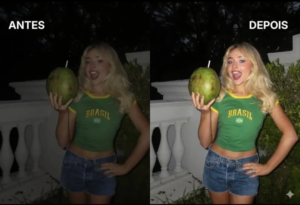
Poor lighting ruins otherwise good images.
Use this structured prompt to fix it naturally:
“Fix poor lighting with precise adjustments. Keep the face and scene intact. Soften harsh shadows on eyes, nose, and chin caused by phone flash. Correct color casts (orange/green/blue) for natural skin tones. Brighten underexposed areas while preserving realistic skin texture. Final result: a night flash photo with clean, natural, and invisible edits.”
💡 Use Case:
- Night photos
- Flash photography
- Low-light portraits
2. Mirror Selfie → Studio Portrait
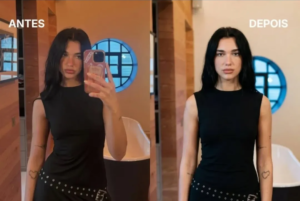
Turn casual selfies into professional outputs.
“Fix harsh lighting while keeping the face and scene natural. Soften strong shadows on the eyes, nose, and chin caused by flash. Correct color casts for accurate skin tones, brighten underexposed areas, and keep skin texture realistic with invisible editing. Final result: a natural-looking night flash photo.”
💡 Use Case:
- Personal branding
- LinkedIn photos
- Portfolio images
3. Corporate / LinkedIn Portrait Prompt
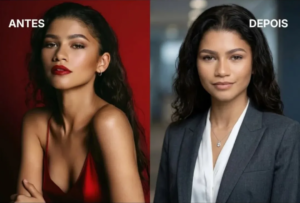
“Head-and-shoulders composition using the rule of thirds, with a soft bokeh background (neutral gray/blue/charcoal, 85mm f/2.0 look). Studio-style 3-point lighting with soft key and rim light, formal attire, natural pose, light makeup delivering a high-end professional photo”
💡 Use Case:
- Resume photos
- Business profiles
- Company websites
4. Natural Hairline Fix
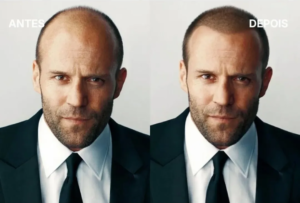
“Use the base photo to restore the hairline in a natural way. Fill in receding areas and the front line with matching color, texture, and density. Lower the hairline by 5–15 mm into a natural M-shape or rounded form. Keep the original hairstyle, facial features, and expression unchanged. Final result: the same photo, with slightly fuller, more youthful hair and an imperceptible edit.”
💡 Important:
Keep edits subtle realism matters more than perfection.
5. Clothing Color Change
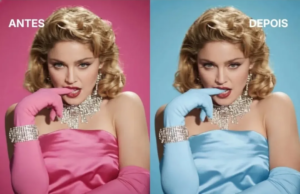
“Change the clothing color from [CURRENT] to [TARGET]
Keep everything else untouched: face, skin, hair, accessories, and background
Accurately detect fabric edges
Preserve lighting tones, highlights, shadows, and material texture (denim, silk, cotton)
Maintain natural folds and fabric flow without distortion
Avoid any color spill onto skin
Final result should look fully realistic and seamless”
💡 Use Case:
- Fashion edits
- Brand variations
- E-commerce visuals
6. Posture Correction Prompt
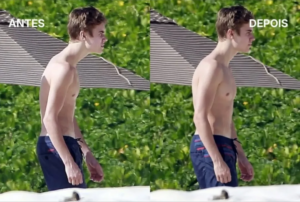
“Subtly adjust body posture: shoulders back and down, chest slightly lifted, head naturally aligned with the shoulders, and spine straight. Keep the body language relaxed, confident, and natural. Clothing should fall realistically with the new posture. Preserve the original face, identity, background, and lighting. Final result: the same photo with a natural, improved posture.”
💡 Use Case:
- Portrait correction
- Fitness visuals
- Professional photos
7. Product Photography Prompt
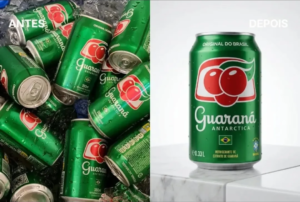
“Professional product photo for e-commerce
Perfect accuracy in brand, color, shape, and details
Surface: minimal white table or light marble
Background: clean white or soft gradient
Lighting: soft key light at 45°, fill light, subtle backlight
Result: high definition, commercial quality, premium look”
💡 Use Case:
- E-commerce
- Amazon listings
- Branding shoots
👉 You can explore more on product standards from
Shopify Product Photography Guide
8. Remove Dark Circles & Eye Bags
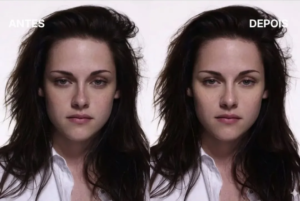
“Subtly reduce dark circles and under-eye puffiness from the base photo. Brighten pigmentation, soften swelling, and reduce shadows. Blend the under-eye tone naturally with the cheeks. Keep the natural eye shape, bone structure, and fine lines intact. Only correct darkness and puffiness—no overall beauty filters. Result: brighter, well-rested, natural-looking eyes.”
💡 Golden Rule:
If it looks edited → it’s wrong.
9. Passport Photo Generator Prompt
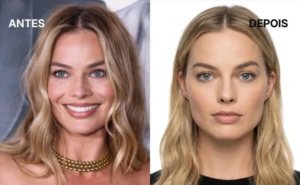
“Generate a valid passport-style photo from the provided face
Tight framing: head and shoulders only
Neutral expression with closed mouth
Exact preservation of facial features and identity
Lighting: even, front-facing studio light with no shadows
Background: pure white, clean and uniform
Output: sharp focus with professional studio quality”
💡 Use Case:
- Official documents
- ID generation
The Bigger Insight
These prompts aren’t just “cool tricks.”
They represent something bigger:
👉 AI is becoming a design collaborator, not just a tool.
At Ishikawa, we don’t just use AI we structure it.
Because the difference between:
- average output
- and professional output
is clarity of instruction.
Internal Learning
Want to understand how structured thinking improves outputs?
👉 Read: Is Design Really Problem Solving?
Final Thoughts
The future of design isn’t about doing more work.
It’s about:
- Giving better instructions
- Iterating faster
- Maintaining realism
These prompts are just the beginning.
As AI evolves, the real skill won’t be tools it will be thinking clearly enough to guide them.